

Note: This page describes F[no] 0.4.9. From 0.4.9,fno inbox law setreads the live rulings near your new law first. Near means 6 or more shared topic words with the new law, at half or more of the shorter text. If one is near, the command refuses with exit code 3 until you name each one. Name it--supersedes <id>to retire it, or--keep <id>to keep it beside the new law. How law stays current covers the refusal and the sweep that follows the write.
Review a recorded decision
Before you change a ruling, inspect its record in the Decisions view. Follow Review recorded decisions for the mux and web views, filters, audit queue and terminal action steps. Your agent can explain the record while you inspect it.Answer a question
D1.
What the agent runs
The agent shows the question and its options in your session. Reply in your own words, for example “call it export”. The agent then runs:D1. The agent passes that number as <QUESTION_ID>. The command prints closed D1 (decision d-... recorded). The question leaves your board, the list of questions that wait for you. Your answer keeps the number of its question. One number for a question and its answer explains why.
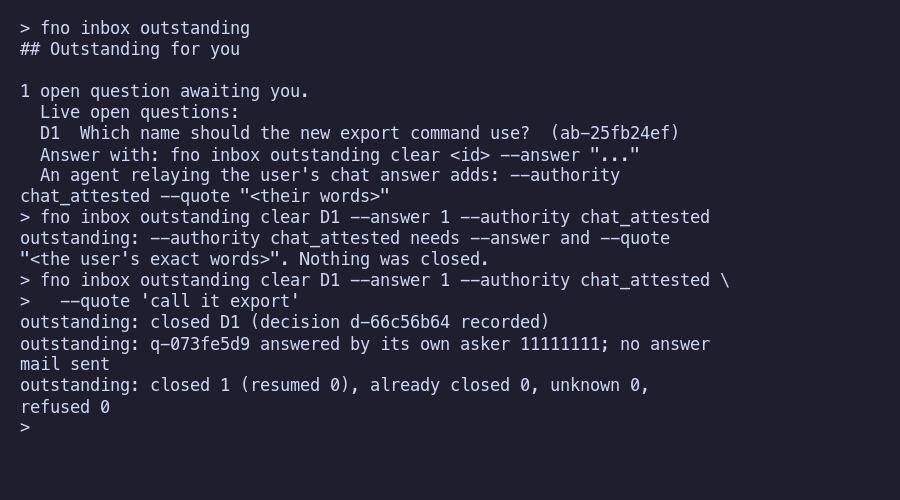
- The quote is required. Without it the command exits with code 2, and the question stays open.
- The record says
chat_attested, so a reader can tell it from an answer typed at a terminal. - A chat answer never grants a merge. Answer a merge question on your board.
- Your answer stays in force on that node. A new question on the node is refused until you retract the answer, as Drop a rule shows.
--authority and no --quote. The next section explains remote copies.
Open the asker in the mux
Before you answer, you can look at the session that asked. In the mux, click the bell in the tab bar, then select Questions. Select a question withj or k, and press Enter to open it. Press w to open the asking session. A live pane comes to the front. If the asker has stopped, its row menu opens, where Resume starts it again. The footer names the key as w open. This w is not the notifications wide toggle that Resize a split lists.
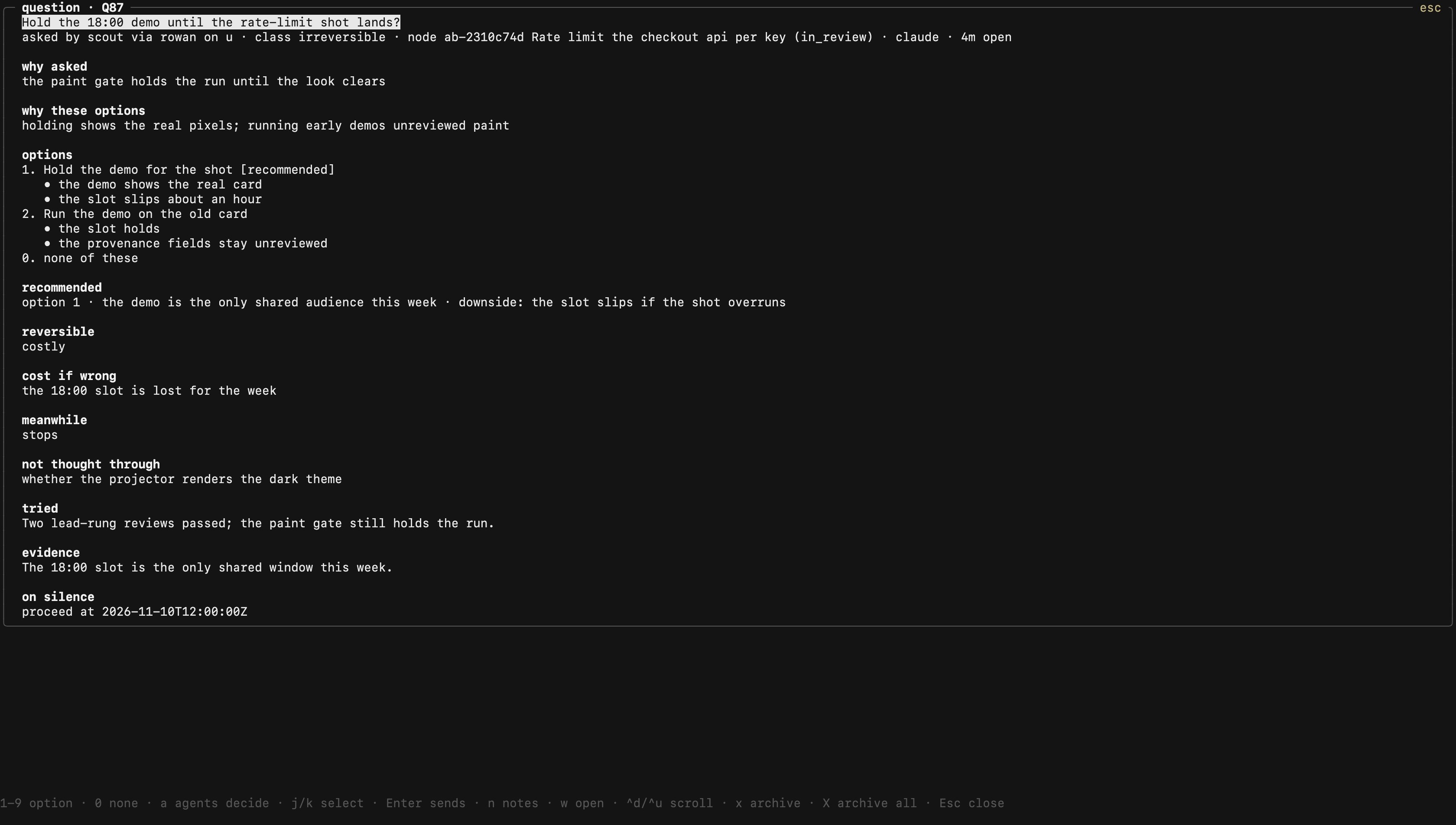
Note: Thewkey is on the main branch after F[no] 0.4.8rc2. The 0.4.7 release and the 0.4.8rc1 and 0.4.8rc2 pre-releases have now openin the footer. On those buildswopens only a live pane. Other rows readsession not on this bridge.
Answer a question from another machine
on <host> and has an ID such as <QUESTION_ID>@<HOST>. Questions reach other machines only with a shared store configured.
In F[no] 0.4.6, attached screenshots travel with the question through the shared store. Each receiving machine saves local image files for its copy. You do not need the asking machine’s filesystem to view those images. If the original image file is missing, F[no] cannot copy its bytes.
In the mux, click the bell in the tab bar, then select Questions. Use j or k to select the copy. Press Enter to open it. Choose an option with its number, then press Enter to send. For a question with no options, press Enter, type your answer and press Enter again.
To inspect an attached screenshot before answering:
- Open the copied question from the bell’s Questions tab.
- Use the left or right arrow to select a screenshot in its screens strip. Press
Enterto expand it. - Press
Escto return to the question. Pressjorkto return to the answer options.
What the agent runs
The agent finds the copy withfno inbox outstanding. It identifies the question ID and source host from that list. If you want a terminal reference, it substitutes those values and your answer here:
the answer goes there. This records the answer here and sends it to the asking machine. It closes nothing here. The background pull fetches changes from the shared store. After the asking machine applies the answer, the next pull closes the copies. Ask your agent to check fno inbox outstanding again. Closure removes the copy from that open-question list.
A bare clear, without --answer, refuses on a copy. A second answer to that copy refuses with the first answer stands. If the answer cannot apply, a notice names the question, reason and source host. If the question remains open, answer the original on that host.
Record a law with limits
What the agent runs
For the example above, the agent records the law after it receives your exact words:d-... ID. From 0.4.9, a law that says nearly the same thing as a live ruling refuses. The agent names each near ruling with --supersedes or --keep, then retries. The refusal names the ruling IDs. The agent reports the new ID and checks the law with fno inbox law history <LAW_ID>. The agent substitutes the returned ID for <LAW_ID>. In every example, <YOUR_EXACT_WORDS> means your verbatim instruction, which the agent asks you to supply.
--user replaces --person. --user alone selects your user. --user=<NAME> names a user explicitly. --machine selects this machine, and --global selects every session. One law takes one scope flag.
The agent can also limit sessions with --filter <KEY>=<VALUE> or exclude them with --not <KEY>=<VALUE>. For example, --filter branch=release* selects branches whose names start with release. See filters for the supported keys and missing-fact behavior.
Set a law’s active periods
What the agent runs
The agent asks for the subject, decision, start date, end date and your exact words. It usesYYYY-MM-DD for both dates:
--supersedes <LAW_ID> with that law’s ID. The new ID preserves the previous row in history.
When that node closes, --from event:<NODE_ID> starts the law. The agent asks which node you mean. --while <COMMAND> keeps it on while a state check exits 0. The agent agrees that check with you before recording it. You can combine these conditions, and every condition must pass. See Active periods for clock and cache details.
Renew a law
What the agent runs
The agent finds the law withfno inbox law history <SUBJECT>. It asks for the end date and your exact words:
<LAW_ID> is the law’s d-... ID. <END_DATE> is its new last day, in YYYY-MM-DD form. Renewal records a new ID that supersedes the previous law. The command prints that new ID.
If several live laws match a subject, the agent renews one by ID. An agent can renew a chat-recorded law with your quoted instruction. For a terminal-recorded law, it asks you through a question on your board. Renewal does not change who can authorize that law.
Prepare a machine for a wide law
What the agent runs
The agent needs access to both the destination machine and the machine holding your user key. If it lacks access, ask an agent on each machine to perform its part. Transfer only the destination public key and certificate line between them. The agent reads the destination machine’s public key:Explain why a rule applies
What the agent runs
For an example edit todocs/guide.md, the agent sends one JSON request to the law match command:
project uses the current directory’s project. The response lists each rule’s status and clauses. Each clause names a filter, whether it held, and the value it saw. See Rule explanations for the statuses.
Drop a rule, or bring it back
What the agent runs
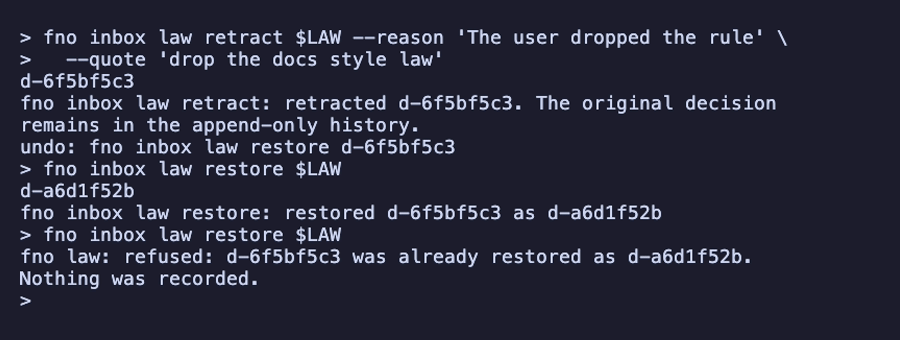
A law is a durable rule that agents read before they ask. Each law and each chat answer has an id that starts withd-. To undo a chat answer, use its decision ID as <LAW_ID>.
Say which law to drop. The agent asks for your reason and records your exact words with the retraction:
Restore the law
What the agent runs
The agent runsfno inbox law restore <LAW_ID>. The command prints a new id.
Why a question reached you
What the agent runs
A worker is an agent on one task. A lead is an agent that supervises workers. A worker’s question goes to its lead first. The lead answers it or passes it up. Some classes of question go only to you:irreversible, money-security, outside-reach, taste and law-change.
An unanswered question shows on your board 10 minutes after it reached its holder.
To start or contact a lead, see Work a backlog with agents.
To send every question straight to you, set route = "direct" in the [questions] table of .fno/config.toml. Question routing has the other values and the class lists.
Next steps
- Clear a correction the stop gate holds: the turn end refuses until you record and ack the correction you typed.
- Command page: see the questions that wait for you, by machine.
- CLI reference: look up
fno inboxcommands.