

Read the exact report before you decide. Turn the report on or off. Check its state, and read each report it sent.F[no] can send its maintainers one usage report a day. It sends nothing until you say yes at a terminal. The report holds counts and identifiers only. It never holds a prompt, code, a path, a title, a hostname or free text.
fno doctor telemetry controls the report. It has four actions: status, show, on and off.
Before you begin
- You installed F[no]. See Install and verify.
- A terminal that you type in. An agent cannot turn the report on for you.
- Optional:
jq, to print the report in a readable form in step 2.
Note: This page covers F[no] 0.4.9. To check your build, runfno doctor telemetry status. If it prints a line that starts withusage report:, your build has the report.
Decide on the report
-
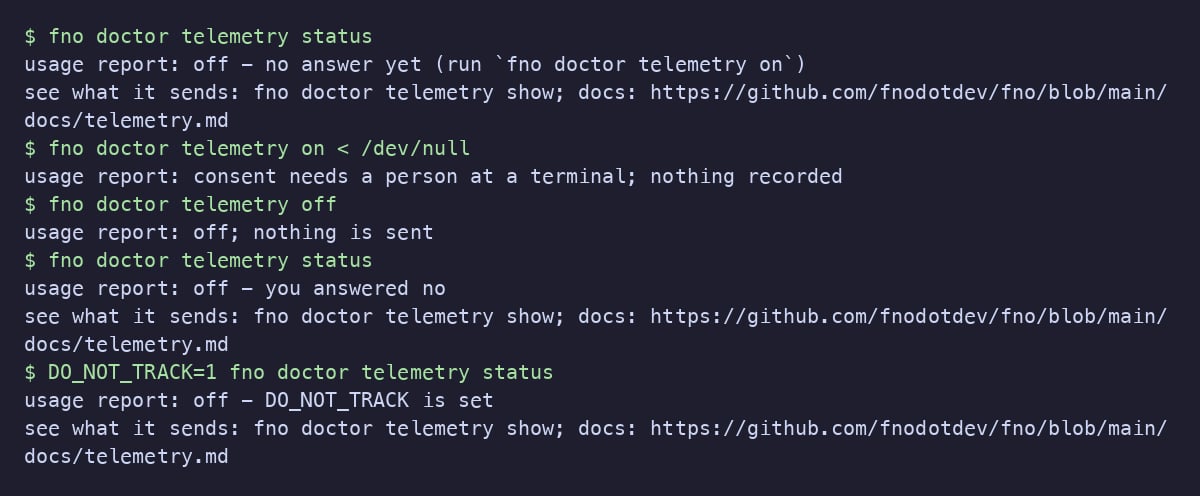
Check the current state:
On a new install, nobody answered yet:
-
Read the exact report the next send posts. This command sends nothing:
showwrites the report body to stdout. On stderr it writes two notes: the folder that keeps sent reports, and every event kind the report counts.2>/dev/nullhides the notes. Withoutjq, runfno doctor telemetry showand read the body as one line.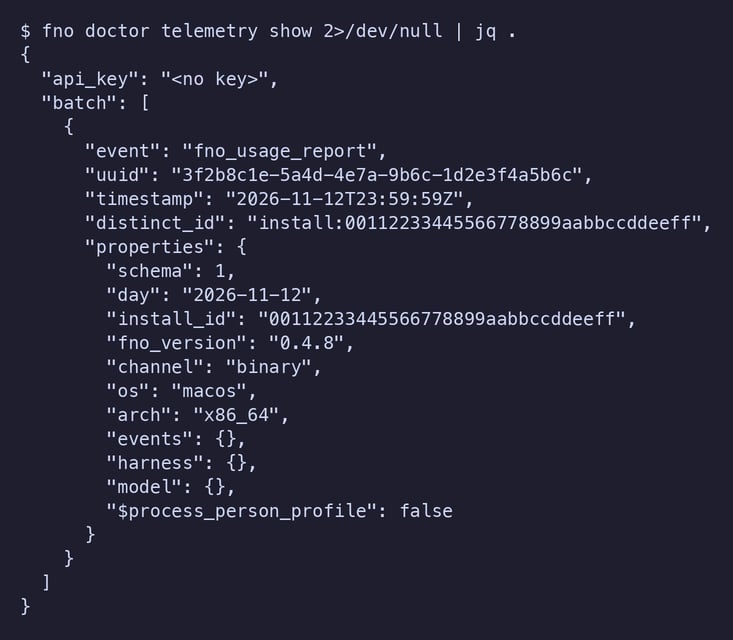
events,harnessandmodelare empty. On your machine they hold counts. The build came from fno main before the 0.4.9 tag, sofno_versionreads0.4.8.api_keyreads<no key>in a build that cannot send. An official release build shows its public PostHog project key there. That key is part of every release build, not a secret of yours. -
Give your answer. To say yes, run
on:onprints the same report, then asksSend this report once a day? [y/N]. Typeyoryesand press Enter. Any other answer, an empty one included, records nothing and keeps your earlier answer. In a build with no key,onalso printsThis build carries no key, so it never sends, even with a yes.A yes prints:To say no, runoff: -
Run
fno doctor telemetry statusagain. The first line shows your answer:
Send fno a daily usage report?. Its default is no. A yes in the wizard records nothing. It gives you fno doctor telemetry on as your next step, so you read the report before you answer.
Why on refuses
on needs a person at a terminal. In each of these cases, it refuses with exit code 2 and records nothing:
- stdin or stderr is not a terminal, for example in a script or a pipe
CIhas a value that is not empty- the shell belongs to an agent harness:
CLAUDECODE,CODEX_THREAD_IDorFNO_AGENT_SELFhas a value that is not empty
off has no such limit. It works from any shell, a script included.
Turn the report off with a setting
Each of these stops every send, whatever answer you recorded:telemetry.usage_report.enabled can only turn the report off. Its default is true, and true sends nothing without your yes. No setting turns the report on. Only a yes at fno doctor telemetry on does.
Check what F[no] sent
F[no] keeps the exact body of each report it sent. The files are inotlp_export/usage_report/sent/ in the agents home, one per day, named <day>.json. The agents home is ~/.fno/agents unless FNO_AGENTS_HOME names another folder. F[no] keeps the last 30 files.
Your answer is in consent.json in the usage_report folder. Only fno doctor telemetry on and off write that file.
How it works
The F[no] daemon checks once an hour. The report covers the last complete UTC day. If that day has no file insent/, the daemon sends the report to PostHog, a third-party analytics service, and writes the file. The daemon sends only the day before today. If the daemon does not run on a day, that day never sends.
Before each send, F[no] checks these gates in this order. The first gate that holds stops the send, and status names it:
DO_NOT_TRACKorOTEL_SDK_DISABLEDis1ortrue.CIhas a value that is not empty.telemetry.usage_report.enabledisfalse.- You did not answer, or you answered no.
- Your yes was for an older report schema.
- The build has no key.
on asks you again.
What the report holds
Onefno_usage_report event for each UTC day, at schema 1:
A harness or model name must be one identifier: letters, digits and
-_.:/, 128 characters at most. F[no] drops any other value.
The event around these fields holds four more values. uuid is the event id. timestamp is the last second of the day. distinct_id is install: and the install id. $process_person_profile: false tells PostHog to make no person profile. A journal row is one line that F[no] writes to its local event log, such as one agent spawn.
To see the list of event kinds that the report counts, run fno doctor telemetry show and read the second line on stderr.
Limitations
The report cannot go to a server you choose
The report goes to one fixed PostHog address. If you do not want it to go there, answer no or use one of the settings in Turn the report off with a setting.F[no] 0.4.8 had a different install count
F[no] 0.4.8 had an install count at session start, behind thetelemetry.install_count key. Without a PostHog token on the machine, it sent nothing. F[no] 0.4.9 removes it. The telemetry.usage_report key replaces that key.
Next steps
- Configuration reference: the other config keys, with the eval events telemetry.
- Install and verify: install or update F[no].