

Before you begin
Install F[no] through the quickstart, and create thet-docs-example worker with Run a fleet. A headless worker cannot get mail, because no session stays.
The CLI reference has the command shape.
Send one follow-up
What the agent runs
Your agent addresses the worker by its registered name and sends this from a terminal:fno mail send is the root spelling of fno agents mail send in F[no] 0.4.6. Both use the same arguments and receipts. The latest release is 0.4.7.
Read the receipt
What the agent runs
The command prints one line of JSON. This is a real receipt, with the transcript path masked:status. It says how far the message got.
accepted does not prove that the worker acted on your message. Only the transcript can show that.
The receipt says NOT LANDED
What the agent runs
Aqueued (durable) receipt can come with this block:
queued (durable) receipt. F[no] holds a copy, and the worker gets it the next time it reads its mail. Do not send a second copy while this copy waits, because the worker then gets it twice.
The block prints the older spelling fno agents peek. It runs the same command as fno agents session peek.
To recover, do these steps in order:
- To look for the message in the transcript, run
fno agents session peek <WORKER> --grep fmail-<ID>. - To wake the worker, run
fno agents session resume <WORKER>. - If you still need to send again, first withdraw the copy with
fno agents mail admin withdraw fmail-<ID>. Then send the message.
The name is wrong
What the agent runs
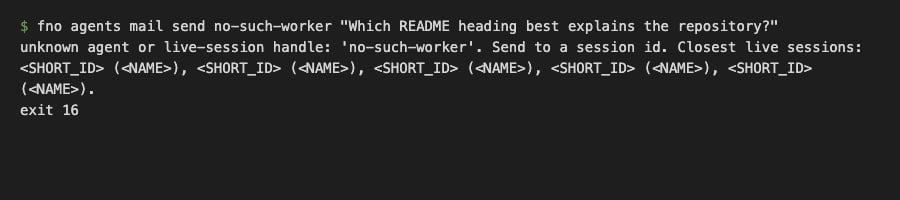
This is a real refusal, with the session IDs and names masked:fno agents session list, and copy the exact name.
Mail the lead of a scope
What the agent runs
--to-lead addresses a role, not a session. F[no] finds the session that holds the lead role at send time. A lead can change, so do not copy a lead’s name for later mail. Use --to-lead again.
The message can come from one of three forms. Use only one:
- the one positional message:
fno agents mail send --to-lead fno "The review is done." -b <body>--body-file <path>
--to-lead <SCOPE>: resolved to <NAME>.
--to-lead does not work with --to-project, --to-self, --raw, --force or --any. Each of these flags picks a different address, and the command exits with code 2.
When no session holds the role, the refusal reads like this, with the scope masked:
Reply to a message
What the agent runs
Name the message you answer with itsmsg_id. Both forms do the same thing:
msg_id as the first positional. If a positional starts with fmail- or msg- and has no spaces, F[no] reads it as a msg_id. The body is the next positional, --body <str>, or --body-file <path>. --from <project> names the project that sends the reply.
The reply goes back by the lane of the message you answer. A real receipt, with the IDs masked:
--to and a positional msg_id together. That gives two targets. The command exits with code 2:
Check the answer
What the agent runs
msg_id as the receipt. That proves that this question is your message.
If you see your question and no answer, the worker has not finished. Wait, and peek again. If you see no question, the message did not land.
You sent a worker a question and read its answer.
Read a held release
Note: The fold line is on the main branch after F[no] 0.4.8rc1. The 0.4.7 release and 0.4.8rc1 do not include it. On those releases, the count line exists and every message renders whole, with no fold line.Mail that cannot land right away waits on the bus, F[no]‘s mail store. A receipt that says
queued (durable) names one such waiting mail. F[no] holds delivery so mail cannot interrupt an active worker. The hold states: you typing into it, a draft open in its composer, its row Blocked in Needs input, its Stop hooks still running. A stopped worker, one whose process ended, holds nothing, so mail still reaches it and can wake it.
When the hold lifts, F[no] delivers the waited mail as one turn. That turn is the held release.
Every hold has an end. A worker can also ask for a do-not-disturb hold with fno agents mail admin hold. --for <minutes> holds for that many minutes on the wall clock. --minutes <minutes> holds until that many quiet minutes pass. --on holds until the hold ceiling, and --off lifts the hold and delivers the held mail. No hold lasts longer than the ceiling, so --for and --minutes also stop at the ceiling. The ceiling is 480 minutes by default. To change it, set mail.hold.max_minutes.
What the agent runs
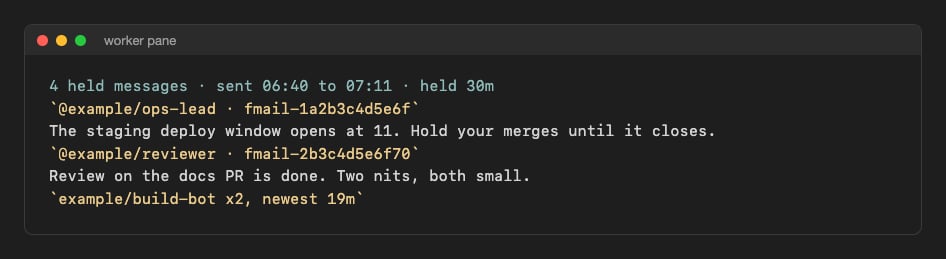
render_held_release_at from invented senders and times. It is not a captured live hold, and its names and numbers differ from the example above.
Read the turn line by line:
A fold groups mails from one sender whose bodies differ only in digits and whitespace runs. Wake mails are check-in reminders from the fno-lead-wake sender, and two that differ only in their minute count share one shape. Bodies that differ any other way never group. The counts always add up: the headers and the
x counts together equal the first line’s total. A fold line shows the name without @ and carries no msg id, so there is nothing to answer in it.
A body cannot carry a fold line
A mail whose body carries a fold line refuses to send. A fold line is one backticked span covering a whole line. Prose that only mentions the shape sends fine. The refusal reads:Read the Messages view
The mux has a view for this mail. It shows every conversation on this machine, plus mail from your other machines, and you read it yourself. Read mail in the Messages view covers the opening chord, the columns, the reply control, and copying a mail ID.Mail can wake a stopped worker
What the agent runs
In a real test with Claude Code, a stoppedthread worker took a new message and answered it. The receipt was accepted-new-turn.
Other harnesses can differ, so read the receipt. Stopping a worker does not always end its ability to take mail. To bring a stopped worker back on purpose, use resume. To end that, remove the worker.
Next steps
- Recover a worker: inspect a worker that does not answer, then remove your practice worker.
- CLI reference: look up the send and peek arguments.