

Note: These features are recent. The 0.4.7 release and the 0.4.8rc1 and 0.4.8rc2 pre-releases do not include the machine and directory fields or the 10,000-line default. Check your version with fno --version.
Before you start
Install F[no] through the quickstart. Open the mux withfno, and create a workspace, as described in Create a mux workspace and start a session.
What the frame shows
A pane of at least 20 columns and 4 rows wears a frame. A smaller pane keeps the plain divider with no fields.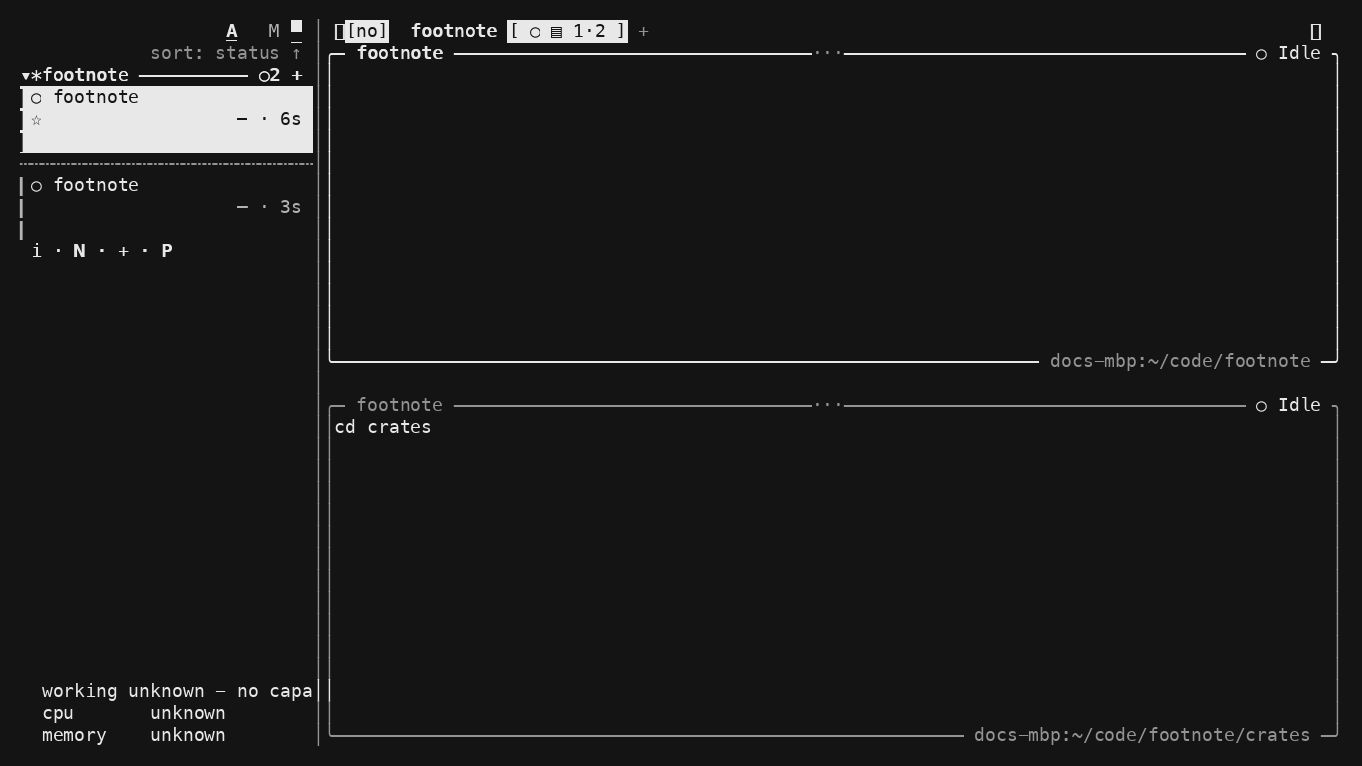
The bottom edge carries:
The machine and the directory sit together on the bottom edge, joined by a colon:
docs-mbp:~/code/footnote.
The directory field reads the shell’s live directory, not the folder the pane started in. Type cd in the pane. The frame updates at the next layout change, such as after a pane opens, closes, or moves, or after the focus moves between panes. A focus move forces the update at once. The client abbreviates your home folder to ~.
A plain shell pane shows the machine and the directory too. It carries no node, branch, context, or model field.
What a narrow pane drops
While a pane wears a frame, the frame drops whole fields in a fixed order. It never cuts a field mid-word. On the bottom edge, the context drops first, then the machine, then the directory, then the branch. The node name is last: it shortens to fit. On the top edge, the model drops first, then the status word, then the pane’s name shortens. The observers count always stays. To give a pane more width, resize it as described in Set mux keys and resize splits.How much history a pane keeps
Each pane keeps its last 10,000 lines by default. When a pane produces a new line past the cap, it drops its oldest line. The cap is a memory decision, and the cost grows with the pane’s width. A kept line costs every column of the pane, so a 200-column pane costs about 2.5 times an 80-column pane. At 80 columns, 1,000 kept lines cost about 2 MB per pane. In a measured run, 16 panes that each kept 100,000 lines held 3,207 MB in the mux server. At the 10,000-line default, the same panes held 339 MB. The numbers are medians of 30 samples on macOS, measured with themux_footprint example described below.
The cap also bounds how far fno mux pane read --lines reaches into a pane’s history.
Set the scrollback cap
mux.scrollback_lines is an integer. Its default is 10000, and the smallest value is 1. The config refuses smaller values. Set it in the [mux] block of your config.toml:
~/.fno/config.toml
[mux] block of your global config.toml, ~/.fno/config.toml. Check the stored value at any time with fno config get mux.scrollback_lines. To edit the file by hand instead, write the same lines into it:
~/.fno/config.toml
graceful means the server shut down on request. The child number is the pane’s shell process, and the keeper number is the helper holding it open.
A pane without a live keeper makes the command refuse. The refusal names each such pane and offers fno mux kill-server main --end-unkept to end them deliberately. Ending a pane closes its shell.
Start the mux again with fno. The new server adopts the kept panes again and reads the new cap. A kept pane keeps its scrollback history across the restart.
You can also set the FNO_MUX_SCROLLBACK_LINES environment variable before you start fno, for example export FNO_MUX_SCROLLBACK_LINES=20000. It overrides the config key for the server that start spawns. A value of 0 or less in the environment keeps the default.
Measure pane memory
Themux_footprint example measures what panes cost in memory on your machine. It needs a source checkout of F[no]:
--scrollback N sets the cap for the measured server, so you can compare caps directly.
No machine or directory on the bottom edge
The bottom edge showsnode · branch, but no docs-mbp:~/... span, after you update F[no].
A mux server from your old build is still running. An old server does not fill these fields. The client cannot invent them.
What to do:
- Restart the mux server as described in Set the scrollback cap. The new server fills the fields.
- Check the bottom edge again after the mux opens.
Next steps
- Set mux keys and resize splits: pane size decides which fields the frame keeps.
- Run a fleet: fill panes with agent sessions whose frames carry status, model, and context.