

Before you begin
Install F[no] through the quickstart and run commands from your project repository. The CLI reference lists the inspection and editing doors. The configuration reference describes saved views.Inspect the board
What the agent runs
Record and edit work
What the agent runs
Create a small task from your project terminal:<TASK_ID> below with the ID from that receipt:
Updated and the node ID. Read its notes as well as the original description.

fno backlog update. Creating another idea with the same title does not edit the old node.
Priorities run from p0 to p3. Difficulty describes the work itself: low, medium, or high.
Read a node’s short number
What the agent runs
In F[no] 0.4.6, backlog nodes can have short numbers such asx-15 or fb-15. Each prefix has its own count. The durable hash ID stays unchanged. If a number exists, fno backlog get <TASK_ID> includes _number.
A short number resolves through the store that assigned it. Machines on one shared primary use its count. Independent stores can assign different numbers. Use durable IDs in shared work, PR bodies, and reports to teammates. If no short number exists yet, use the durable ID.
Tag and find related work
What the agent runs
A tag has the formfacet:value. One vocabulary file in F[no] lists the legal facets and values:
When the classifier is sure, a new node gets
audience and area tags. Add or remove a tag with fno backlog update:
tier-hold, stays legal. Removal does not check the vocabulary, so you can remove a tag the vocabulary later drops.
Find nodes by tag, or rank the nodes related to one node:
--tag keeps only the nodes that carry every tag you name. It works with or without a search query. --related ranks live nodes from every epic. Its score reads shared words in the title and details, shared area, harness, and topic tags, and a shared epic. Each row ends with the reasons it ranked.
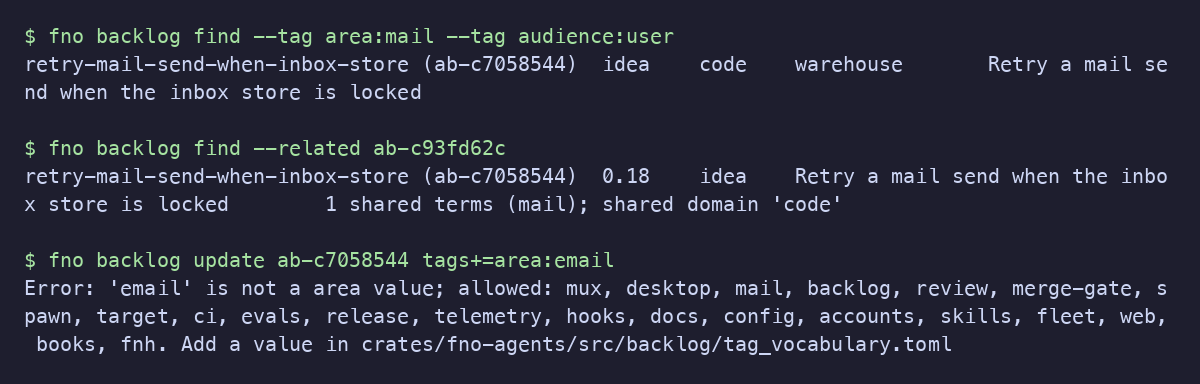
find by tag and by relation, then a tag the vocabulary refuses, in a disposable backlog.
On the board, the tag filter widens inside one facet and narrows across facets. area:mail with area:mux shows both areas. area:mail with audience:user shows only nodes that carry both tags.
Tag older nodes
Nodes filed before 0.4.9 carry noaudience or area tag. Read the guesses first, then write them:
--apply will write. The command reads only open nodes. It never replaces a tag a node already carries.

fno backlog update <TASK_ID> tags+=<FACET:VALUE>.
Choose a view
What the agent runs
Saved pages use
backlog.render_targets. The backlog.render_path template renders one page per project that carries nodes. One key covers the whole workspace. The daemon also maintains a local board copy at ~/.fno/cache/pages/graph.html.
The mux is F[no]‘s terminal workspace for watching agents. Its Backlog tab and browser view show projections of the same task graph.
An HTML file opened from disk is a snapshot. It is not a live database editor. Check its render time before acting on its contents.
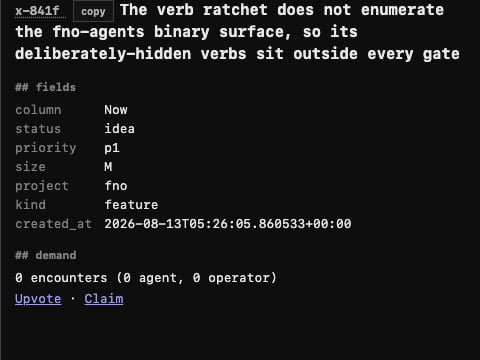
Claim a card from a public board
- Open the project’s published web backlog. This workflow targets F[no] 0.4.6.
- Open an unclaimed card and select Claim in its detail panel.
- Submit the prefilled GitHub issue titled
Claim <id>. Keep the card ID in the title. - Wait for a maintainer to approve the issue and run the import. Check that the board marks the card claimed.
- Submit your contribution as a PR that closes the Claim issue. Use
Closes #<CLAIM_ISSUE>in its body, with the issue number.
--requests to show request links. Ask the maintainer before starting work.
Import approved card claims
What the agent runs
The maintainer needs a committed request issue form and two GitHub labels. Defaults arefno-request and fno-approved. A maintainer applies the approval label by hand. Never include that label in an issue template. The import refuses templates that name it.
github:<login>. Every dispatcher skips the node while that claim is live. The receipt names any conflicting holder.
Run the import at least once a day to renew claims. If the issue closes or loses either label, the next import releases its claim. Without renewal for 24 hours, the claim expires. If the import reads a full --limit page, it releases nothing. It cannot prove that the result is complete.
One login holds at most --max-per-author claims, three by default. A PR from the claimant that closes the Claim issue lets the PR steward, F[no]‘s outside-contribution automation, release the claim and mark the node claim-delivered. The fleet builds from its own plan and records contributor credit. This is not proof that the contributor’s PR merged.
For claims through comments on a shared epic, see Share an epic.
Respect ownership
What the agent runs
Before starting another worker, inspect ownership:<TASK_ID> as above. live or suspect is not permission to start a competing owner.
A free claim means no holder was established by that reading. Check roster coverage in the same JSON before concluding nobody is working.
roster_workers lists matching workers found by the cross-check. roster_coverage: degraded means the roster was not fully resolved.
If matching workers exist or coverage is degraded, inspect those sessions before assigning another owner. An incomplete check is not proof of absence.
If this task needs another task’s result, record its dependency:
<PREREQUISITE_ID> with an existing node’s ID. A prerequisite with status: done or a recorded completed_at no longer blocks that selection.
Eligibility does not promise an immediate launch. Capacity, ownership, and other dispatch policies still apply.
Do not use priority as a substitute for a dependency. Leave practice tasks clearly labeled rather than assigning them to a live worker.
For all editable fields and lifecycle moves, read the installed help:
Release contained work
What the agent runs
Note: This command targets F[no] 0.4.6. The latest release is 0.4.5.A contained task ships inside an owner’s PR. Its
contained_in field names that owner. Read each task and check its claim before changing its assignment:
<TASK_ID> with the contained child’s ID. If the ID is unknown, ask for it. Use multiple child IDs to release a batch. Do not pass the owner ID or --surface.
The receipt reads released <TASK_ID> from <OWNER_ID>; it dispatches alone again, with the real IDs. The final read shows no contained_in or declared containment surfaces. It records released_from and removes inherited owner PR references. If parent names the former owner, the command clears it.
The former owner’s closure no longer closes this task. Other dependencies, ownership, and capacity can still prevent dispatch. A batch with a missing, repeated, or uncontained node refuses without changes.
The CLI reference describes the release arguments and effects.
Close an umbrella node
What the agent runs
An umbrella node has a plan that promises several PRs, and child nodes that ship them. The plan states the count in itsexpected_url_count front matter field.
--note gives the close a record of why. An umbrella often carries no PR of its own, and a close with no PR, note, or artifact link refuses.
If the count still falls short, the close refuses with exit code 6 and keeps the node open:
fno backlog idea and close with --force --reason "remaining ships filed as <NEW_ID>".
Exit code 4 means GitHub did not answer. The node stays open. When GitHub answers, run the retry command the refusal names, such as fno backlog reconcile --node <TASK_ID>.
Next steps
- Work a backlog with agents: dispatch work and choose a lead scope.
- How work is organized: understand nodes, claims, and plans.
- Backlog pages configuration: set up a saved view.