

Note: This page describes F[no] 0.4.9. In 0.4.9,Bopens the backlog board,Hopens HQ, and=cycles the sideline density. Before 0.4.9,Bcycled the density. The old keysO(backlog) andG(HQ) still work in 0.4.9. The next release removes them.
Before you start
Install F[no] through the quickstart. Open the mux with an agent session, as described in Run a fleet. The prefix introduces a mux shortcut. Its default isctrl+b. To use another key, see Set the prefix. In this guide, prefix+? means press the prefix, release it, then press ?. Uppercase letters mean uppercase keys.
Find the active keys
- Focus the view whose keys you need.
- Press
prefix+?to show that view’s keys as a footer grid. - Press
*without the prefix to open the full keybindings table. - Read your current bindings in the table.
- Press
Escto close the table.
ctrl+b, then:. Press the prefix before each key below that line. The * cell is the exception: while the footer is open, press * alone. If you change a key or the prefix, the footer shows the new key.

Esc or ? to close the footer without opening the table. Below 40 columns or 16 rows, prefix+? opens the full table directly. If the full table opens directly, skip * in the steps below. You can also click the sideline footer’s menu button and select keybindings.
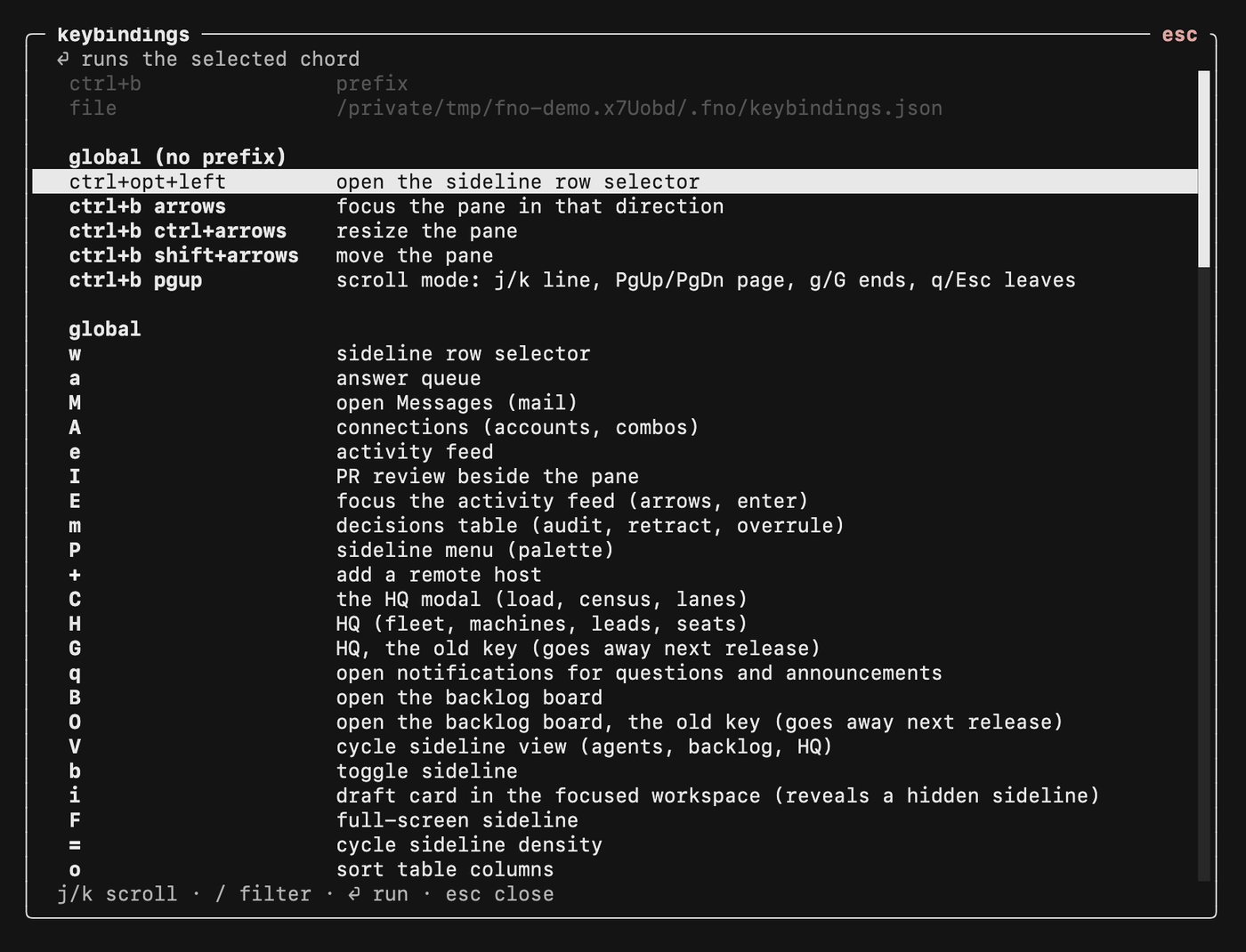
+. For example, it shows ctrl+opt+left, ctrl+arrows, and pgup. You can copy a key from the table into keybindings.json.
These are the built-in defaults. Under "preset": "tmux", z, o and l move to zoom, next pane and last tab. If you change the preset or add entries, check the live table.
In 0.4.9,
O also opens the backlog board and G also opens HQ. The table labels them “the old key (goes away next release)”. Use B and H instead.
The sideline is the panel beside the terminal panes. find searches across the mux. selector moves through the sideline’s own rows.
Key presets
A preset is a named set of mux keys. Since F[no] 0.4.6,~/.fno/keybindings.json holds the preset and your key overrides. It is one flat JSON object. The reserved "preset" key accepts "tmux" or "zellij". Without a preset, the mux keeps its built-in keys, so z, o and l keep their F[no] actions.
Under "preset": "tmux", z zooms the pane, o walks to the next pane, and l returns to the last tab. The three F[no] actions move to free keys: cycle-section to u, sort-agents to Q, and focus-right to _.
The file sits beside the global config.toml. If FNO_GLOBAL_SETTINGS_PATH selects another global TOML file, keybindings.json sits beside that file. The full keybindings table shows the file path. Both presets use ctrl+b unless you change mux.prefix in config.toml. See Set the prefix.
Your action entries override the preset. An entry replaces the preset key for that action. If your entry claims another action’s preset key, the mux removes that preset binding. An unknown preset name reports a warning and keeps the built-in keys. Your action entries still apply.
The old mux.preset and [mux.keys] settings in config.toml no longer control keys once the JSON file exists. Without a JSON file, the mux migrates them to keybindings.json on its next read. It prints a notice to remove the old settings. Once the JSON file exists, the mux ignores those old settings and names the JSON file to edit.
If FNO_CONFIG selects a config file, the mux does not migrate its settings. It reads those legacy settings only while keybindings.json is absent. An existing JSON file takes precedence even with FNO_CONFIG set.
Choose the Zellij preset
What the agent runs
The agent edits the file shown in the full keybindings table. To show that table, pressprefix+?, then *. A file with no custom bindings needs only:
keybindings.json
"preset" and keeps your action entries. To reload and check:
- Open the full table with
prefix+?, then*. - Select
edit keys, then exit the editor to reload the keys. - Check that
split-rightusesrandsplit-downusesd, unless your custom bindings override them. - Press
Escto close the table.
"preset" to "tmux" in the same JSON file. z, o and l take the tmux meanings, and the three F[no] actions move to u, Q and _. Reload through the editor again.
Where the tmux preset matches
This table compares thetmux preset with tmux 3.8’s default prefix table. A tmux window corresponds to a mux tab. Every key below follows the prefix.
The
tmux preset leaves the keys in the Differs rows alone: their actions have no tmux twin. To put the tmux meaning on one of those keys, add your own entry to keybindings.json.
Zellij key map
Zellij uses modes with separate keys. F[no] uses one prefix and one shared set of keys. Thezellij preset maps these pane actions:
The preset also moves
rerun-block from r to u. These differences remain:
- Zellij tab-mode letters reuse pane-mode letters. Tabs keep
c,&,,,p, andnfor new, close, rename, previous, and next. - Resize and move modes do not map. Resize keeps
J K Land the resize chord. Resize left has no letter by default. - Fullscreen, floating panes, stacked panes, and pane frames have no equivalent chord.
- Zellij modes do not exist in this mux. There is no locked mode or mode line.
Change a binding
- Press
prefix+?, then*, to open the full keybindings table. - Select
edit keysto openkeybindings.jsonin$EDITOR. Without$EDITOR, the mux uses vi. - Give the
"selector"entry the semicolon key, or add that entry to the existing JSON object.
keybindings.json
[mux.keys] table or a nested JSON object.
- Save the file and exit the editor. The mux reloads the keys.
- Check that the selector row shows the semicolon key and the
yourstag. - Press
Escto close the table. - Press the prefix, then the semicolon key, to open the selector.
selector. toggle-sideline changes visibility and is a different action. The table tags changed preset keys as preset and your changed keys as yours. Built-in keys have no tag.
Keys accept one printable ASCII character or a control letter, such as ctrl+a, C-a, or ^a. The prefix is not in keybindings.json. To change it, see Set the prefix.
After applying preset precedence, the resolver checks the remaining bindings. It refuses unknown actions, key collisions, and the prefix byte as an action key. Digits 1 through 9 select tabs and cannot be rebound. Enter and Tab cannot be the prefix or an action key. The resolver also refuses their aliases ctrl+m, ctrl+j, and ctrl+i. The mux reports rejected entries. A rejected action entry keeps its default key. Check the live table after a refusal.
Clear a binding override
What the agent runs
The agent removes the"selector" property from the JSON file shown in the full keybindings table. It keeps the JSON valid, including commas between the remaining properties. Do not use fno config unset mux.keys.selector for the JSON file.
After the agent removes the override:
- Open the full table with
prefix+?, then*. - Select
edit keys, then exit the editor to reload the keys. - Check the selector row. Without another entry that claims
w, it returns toprefix+win either preset. - Press
Escto close the table.
Set the prefix
The prefix ismux.prefix in config.toml, in the [mux] table. It accepts a control letter such as ctrl+a, one printable key, or an Alt key such as alt+a or alt+shift+a:
config.toml
Esc, then the key, and the mux reads the pair as one key. A lone Esc still reaches the pane after a short wait. Keys after the prefix stay single keys. The mux does not add Alt chords after the prefix.
The mux refuses three Alt prefixes. alt+[ and alt+shift+o start terminal escape sequences. alt+ with a digit selects a tab. For a refused prefix, the mux keeps ctrl+b and reports the reason.
On macOS, Terminal.app and iTerm2 send a composed character for Option, such as å for Option+a. Set Option to act as Meta or Esc+ in the terminal profile, then write alt+a.
To check the prefix, focus the agents view, press the prefix, then press ?. The footer’s first line shows the prefix in force:

Resize a split
- Find the split’s edge in the table below.
- Press the edge with the left mouse button.
- Drag the edge to the size you want.
- Release the mouse button.
- Focus the view you want to resize.
- Find its keyboard action in the table below.
- Press the listed keys. For a resize chord, press the prefix, then
ctrl+arroworctrl+opt+arrow. - Check that the size changed.
ctrl+arrow or ctrl+opt+arrow. The arrow moves the visible view’s edge. Otherwise, the chord resizes the tiled panes.
The tiled panes also have letter keys:
J, K and L resize down, up and right. Resize left has no letter by default, because H opens HQ. To give it one, add a "resize-left" entry to keybindings.json, as in Change a binding.
The density button sits on the sideline’s top row. It cycles slim, regular, and extended layouts, which also change the width.
In Messages, focus the tree column to move its right edge. The participants and thread columns move the edge between them.
Split sizes have minimum bounds. A drag stops before it hides a pane. A smaller terminal clamps held sizes to the available space. The new backlog, Messages, org, and reply dock sizes last for the session. During those edge drags, Esc restores the original size. The notifications width persists across restarts.
Next steps
- Review a PR in the mux: send comments on specific diff lines to the worker.
- Run a fleet: watch agent sessions and read their results.