

Answer the setup wizard at the end of a terminal install. Finish a skipped setup with bare fno. Add F[no]‘s allow rules to your harness.
The setup wizard is the screen that asks how F[no] runs on your machine: which preset, which harnesses, which background services, which repos. It writes your answers to the F[no] config file. A person answers it once per machine. For the install itself, see Install and verify.
Two terms: a harness is the coding agent CLI that F[no] works inside, such as Claude Code or Codex CLI. The mux is F[no]‘s terminal view of your agent sessions. Bare fno opens it.
After this page, you have a finished setup, and you know how to start it again.
Before you begin
- F[no] installed with
curl -fsSL fno.sh | sh, or withbrew install fnodotdev/fno/fnoon macOS. Install and verify covers the installer. - A real terminal. The wizard reads its answers from the keyboard. An agent session has no keyboard prompt, so an agent uses
fno config setup runinstead. See Set up from an agent.
Answer the wizard at the end of the install
When you run the installer in a terminal, the wizard opens after the binaries are in place. The installer prints this line first:
- Pick a preset with the arrow keys, then press Enter.
balancedis the safe middle: each harness keeps its model, and automatic merging stays off. The three presets are in Install and verify. - Answer each question. Enter takes the default.
bor the left arrow goes back one screen. - Read the list of changes on the last screen. Type
yto write them. The wizard writes no config before this step. The installer wired the plugin into each harness it found before the wizard opened.
Finish a setup you skipped
Some installs do not open the wizard:- a Homebrew install
- an install with
--yes, or withFNO_YESorFNO_NO_WIREset - an install from an agent or from CI, where no terminal exists
- an install where you pressed Ctrl-C or Esc in the wizard
fno with no arguments in a terminal:
fno goes straight to the mux.
If you press Esc to cancel, F[no] writes no config. It prints the path of its report file, ~/.fno/sidecar/wizard-report.json, and the command that finishes setup later:
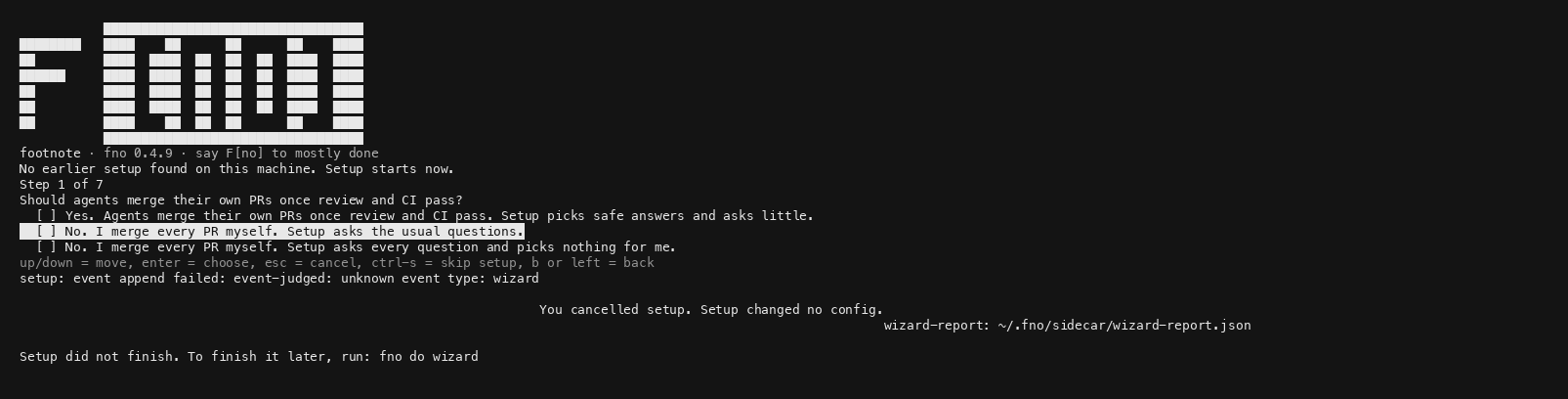
setup: event append failed line. It does not change the result: your config is untouched, and the next bare fno opens the wizard again.
Run the wizard again
F[no] opens the wizard on its own only once. After that, start it yourself:Add F[no]‘s allow rules to your harness
F[no] ships a short list of commands that your harness can allow without a prompt each time. The list holds F[no]‘s own record commands and common reads, such asfno backlog, fno inbox and git status. No rule in it reaches a shell, an interpreter or a merge.
This step is not a wizard screen. Preview it, then apply it:
The step never changes
deny, ask or Auto Mode settings. A second run changes nothing. If you edit a rule that F[no] wrote, the next run keeps your edit and says the file differs from the shipped list.
Set up from an agent
An agent session cannot answer the wizard. It runs the non-interactive setup:fno in a terminal.
Install the plugin from a Claude Code session
The F[no] plugin can install the CLI for you, from inside a Claude Code session. That installer linksfno into ~/.local/bin and edits no shell profile. So you do not need a new session: the next command works in the same session. If your PATH does not hold ~/.local/bin, call ~/.local/bin/fno by its full path.
That route keeps the non-interactive setup. Run bare fno in a terminal afterwards to answer the wizard.
How F[no] knows setup is done
A finished wizard writes the marker file~/.fno/sidecar/wizard-done. This is true for every start: the installer, bare fno and fno do wizard. It holds the F[no] version and a UTC time. On the nightly build used for this page, it read:
fno both read this file. When it exists, neither opens the wizard. Esc or Ctrl-C writes no marker, so bare fno asks again. A wizard that reaches its last screen writes the marker. A change that failed to apply does not stop the marker. Read its report to check each change.
Next steps
- Install and verify: check the CLI version and plugin discovery.
- Harness reference: learn the workflow prompt for your harness.
- Quickstart: take a first task from an idea to a PR.