

Read an idea cap warning, check your finding filed, free room in the capped scope, and set the cap your machine enforces.
The idea cap bounds how many unplanned ideas one scope of your backlog can hold. An unplanned idea is a filed idea with no plan bound to it. A scope is the idea’s nearest epic. If no epic sits above the idea, the scope is its project. When a filing pushes a scope past the cap, F[no] files the node anyway and prints a warning. A finding is never refused for count.
Before you begin
- Install F[no] through the quickstart.
- Know how to file an idea. Manage a backlog shows the filing command.
- Check the installed version with
fno --version.
Note: The warn-and-file behavior ships in F[no] 0.4.8rc2. The 0.4.7 release and the 0.4.8rc1 candidate do not include it. On those builds a scope at the cap refuses the filing. Update moves an installed F[no] up a release.
Read the warning
What the agent runs
Filing from your project repository:--difficulty describes the work itself: low, medium, or high. It is optional. Without it, F[no] files the idea as medium and prints a line that says so.
Note: The machine in this example set the cap to3and filed three ideas first, so the fourth filing crossed it. The default is400. A stock machine warns much later, or not at all. To reproduce the warning, set a low cap first. Set the cap on your machine shows the command.
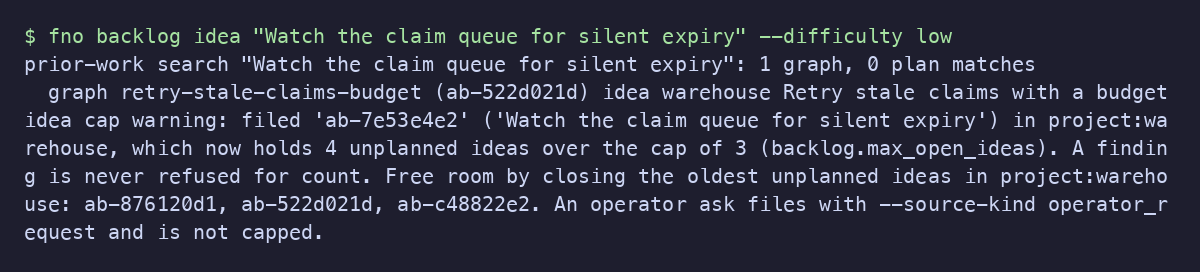
For comparison, the warning itself reads:
filed 'ab-7e53e4e2': the node ID. Your finding is in the backlog under this ID.in project:warehouse: the capped scope. An idea below an epic counts for that epic’s scope instead.now holds 4 unplanned ideas over the cap of 3: the scope held four unplanned ideas after this filing. The cap allowed three.backlog.max_open_ideas: the config key that sets the cap.Free room by closing the oldest unplanned ideas ... ab-876120d1, ab-522d021d, ab-c48822e2: the three oldest unplanned ideas in the scope.An operator ask files with --source-kind operator_request and is not capped: a request from you never counts toward the cap.
Check the finding filed
The warning names the node ID. Read the node back:<NODE_ID> with the ID in your warning. The receipt prints the node’s record, with the same ID and status: idea.
A filing that prints no warning still shows its receipt. The filing command prints {"id": "...", "title": "..."} on stdout, and the ID lives there while the scope is under the cap.
Free room in the scope
What the agent runs
Only unplanned ideas count toward the cap. Close an idea you no longer plan to do:<IDEA_ID> with a node ID from the warning. Replace <why> with the reason, such as duplicate of ab-876120d1. A close without a recorded why refuses with refused: <IDEA_ID> would close done with no record of why. F[no] writes nothing in that case. The receipt reads fno backlog done: <IDEA_ID> -> done.
Or bind a plan to the idea. A plan records scope, files, and acceptance criteria. See How work is organized. A planned idea stops counting:
<PLAN_PATH> with the plan file’s path in your repository, such as plans/claim-watch.md. The binding accepts the path. It does not read the plan’s contents. The receipt reads Updated <IDEA_ID>.
File a test idea after the closures:
What counts toward the cap
The default cap is 400 on every machine.
A public-board claim is an outside contribution. Manage a backlog describes the import.
To file a finding at a person’s direct request, mark it as an operator ask. The cap never applies to an operator ask:
Set the cap on your machine
The cap is one config key, and it covers the whole machine. A scope cannot carry its own cap. Set it from any directory:set backlog.max_open_ideas = 100 (global: <path>). Read the value back:
100 and names the file it read the value from. The store reads the value at the next filing. A lower cap warns sooner. It never refuses a filing.
To turn the cap off, set it to 0:
Next steps
- Manage a backlog: record work, edit it, and read the board.
- How work is organized: nodes, plans, and claims.
- Work a backlog with agents: dispatch work and choose a lead scope.