

Note: Thetracker.backendkey and the--tracker-backendflag are for F[no] 0.4.9. F[no] 0.4.8 selects the backend only through theFNO_TRACKER_BACKENDenvironment variable. Check your build withfno backlog --help. If the help prints the--tracker-backendline, your build carries the flag.
Before you begin
Install F[no] through the quickstart, and read Manage a backlog for the node and board basics. Run commands from your project repository. The github backend reads issues through thegh CLI. Install GitHub CLI and run gh auth login once. Without it, tracker reads fail with an authentication error.
Pick the backend
One key selects the backend for every backlog read and write. Set it in.fno/config.toml in your repository, or in ~/.fno/config.toml for every repository. If the file or its .fno/ directory is not there, create it:
graph, so nothing changes until you select a backend. A project key answers for that repository. A global key answers everywhere a project does not set its own. Switching the backend changes which store the backlog commands read and write. It moves nothing: your graph nodes stay in the graph store, and --tracker-backend graph reads them again.
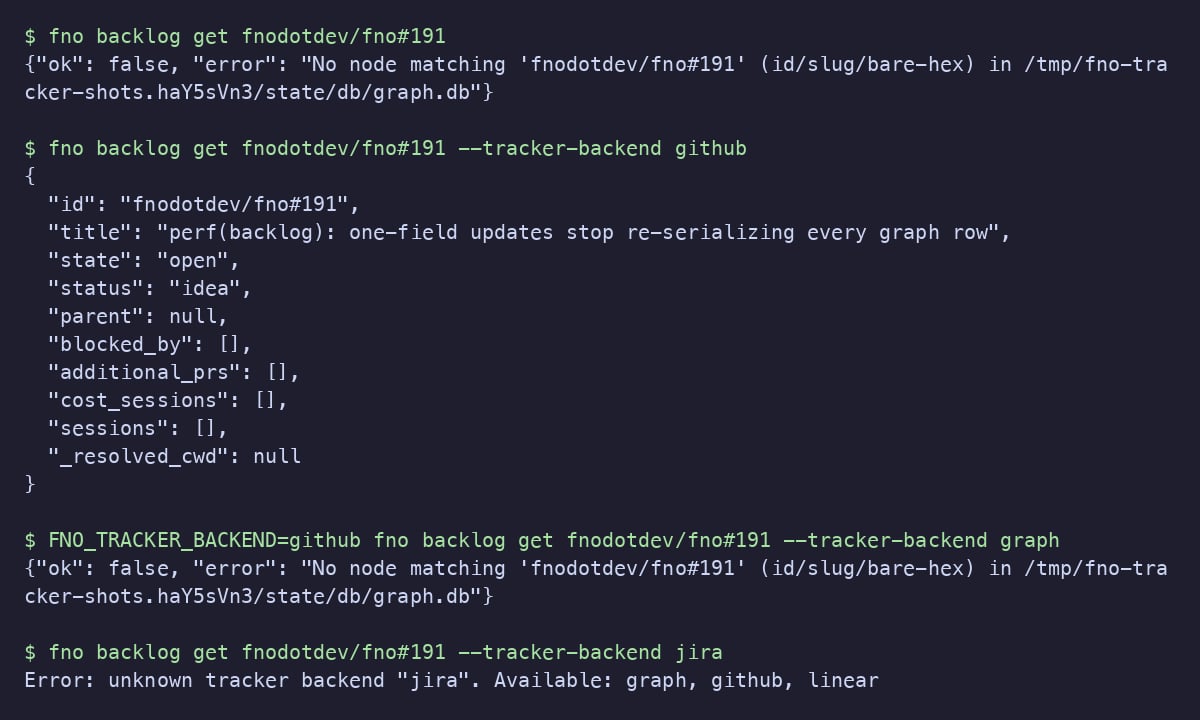
The flag selects for one command and beats the config key:
FNO_TRACKER_BACKEND selects for one shell or one CI job. The chain reads in this order: the flag, then the variable, then the config key, then graph. Use --tracker-backend graph to pin the built-in store over an inherited variable or a standing key.
The rest of this page runs with the config key set, so the examples carry no flag. If you drive the backend by flag alone, add --tracker-backend github to each command.
Set the scope and credentials
Scope and auth ride environment variables by design. A config file never carries a secret.
If the github backend has no repo scope, the listings warn and answer nothing:

Read an item and bind your work
Export the scope variable for your shell session, then read one issue:status, the parent, the session record). The scope variable scopes the listings. A full id reads from the repo its id names. Linear items use the TEAM-123 id shape instead. An id that contains : refuses everywhere: F[no] reserves that character inside its own keys.
The update binds (records) your checkout and plan on the tracker item:
bound owner/repo#123: cwd, plan_path. plan_path names the plan file for the work. The bind stores the pointer. It does not open the file. Under an external backend, update binds exactly four keys: cwd, plan_path, pr_number, and pr_url. Bind any subset of the four in one command. The receipt names the keys it set. Any other key refuses:
update carries the PR keys by hand:
fno do pr bind-created. Standing alone it refuses: it resolves the item from the loop’s bound branch, so outside a loop the update line above is the way.
Some commands own graph-only state. Under an external backend they refuse before they touch anything:
fno backlog find refuses for its own reason: the node metadata it ranks by lives only in the graph store.
What the tracker owns, and what F[no] keeps
The tracker stores what any backlog stores: titles, state, parents, and blockers. F[no] stores beside it what no tracker can express: the checkout (cwd), the plan pointer, the PR number, cost, and session provenance. Session provenance records which sessions worked the item. Nothing mirrors in both places.
GitHub parents and blockers stay empty in the receipt. Reading them costs two requests per open issue per refresh, so the github backend skips those reads.
The board reads an external backend through a snapshot (a copy of the tracker’s items) refreshed every 10 seconds. If the tracker is unreachable, the board answers its last good snapshot instead of going blank.
Next steps
- Manage a backlog: the built-in graph store and the board commands.
- Ship a change: the delivery loop whose ship phase records the PR link.
- CLI reference: every backlog door.
- Configuration reference: where
tracker.backendsits among the keys.