

Install the F[no] plugin from the marketplace with no channel suffix. Turn on auto-update so each release reaches you. Move an oldThe F[no] plugin reaches your harness through a marketplace: a catalog file in the#stable,@stableorfno-nightlyinstall to the release pin.
fnodotdev/fno repository. The catalog pins the fno plugin to the newest release tag and that tag’s commit sha. When a release ships, the release job moves the pin. A marketplace update then brings you the new release.
This replaces two older plugin channels. The stable channel was a branch you named with #stable or @stable. The fno-nightly plugin carried a rolling daily build of green main. Both are retired. To install the CLI itself, see Install and verify.
Before you begin
- Claude Code or Codex CLI.
- Network access to GitHub. The marketplace add clones the
fnodotdev/fnorepository.
Install the plugin
Claude Code
In any Claude Code session, run:#stable to the repository name. The catalog on the default branch already points at the release.
The add clones the repository. A slow connection can hit the 120-second “Add marketplace” timeout. Run the add again.
Codex CLI
In a terminal, run:@stable to the repository name.
Check the install
From a terminal, list the Claude Code plugins:fno@fno with Status: ✔ enabled.
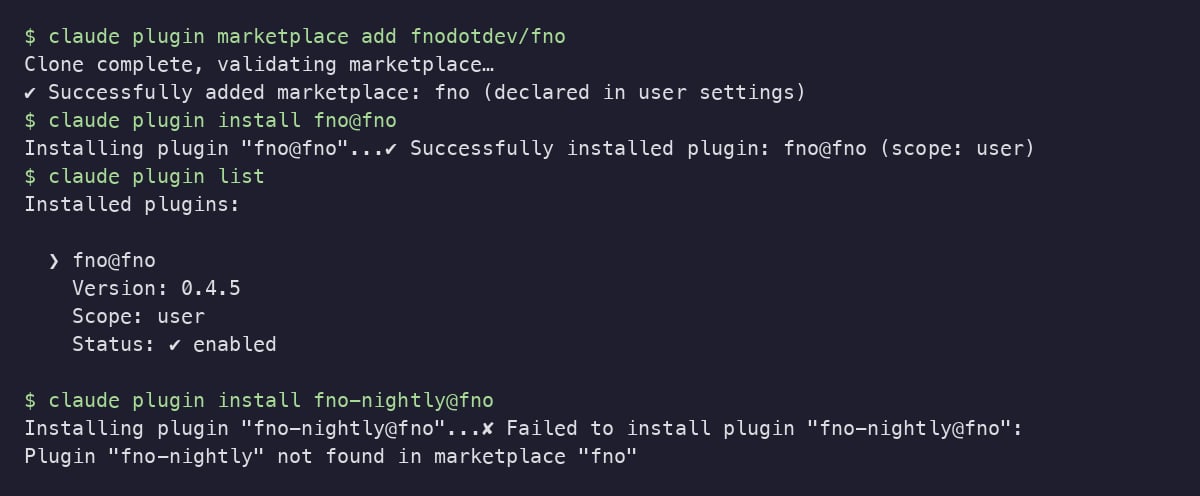
Version line reads the version field in the plugin’s own manifest, not the release tag. The two can differ: the v0.4.8 release still reads 0.4.5 there. To see the commit you run, read gitCommitSha for fno@fno in ~/.claude/plugins/installed_plugins.json. Compare it with the sha of the fno entry in the catalog. The entry’s ref names the release tag.
In Codex CLI, list the plugins:
fno@fno row reads installed, enabled. Its source column names the release tag and the sha, for example ref `v0.4.8`, sha `fd456348...` .
Keep the plugin current
Claude Code turns marketplace auto-update off by default. Turn it on once:- Run
/pluginin a Claude Code session. - Open Marketplaces and select fno.
- Choose Enable auto-update.
/reload-plugins. That command loads the new plugin into the current session.
Without auto-update, update by hand after each release. Read the catalog again, then update the plugin:
fno@fno row names the new release tag.
Move an old install
You added the marketplace with #stable or @stable
The release job no longer moves the stable branch, so that install stops at its last release. Uninstall the plugin, remove the marketplace, and add both again with no suffix.
In Claude Code:
codex plugin marketplace remove fno. Then run the two commands in Codex CLI.
You installed fno-nightly
The catalog no longer lists fno-nightly, and it marks that plugin for removal. A marketplace update can then remove your copy. If /plugin still lists fno-nightly@fno after the update, uninstall it:
fno binary, not a plugin.
Next steps
- Install and verify: install the CLI and check the plugin wiring.
- Harness reference: the workflow spelling for each harness.
- Troubleshooting: fix a plugin that does not appear in a session.